BOSGAME M5
Not available on www.amazon.co.uk
Two mini PCs side by side: what each one suits, where they differ, and the price of each on amazon.co.uk.
Updated
Not available on www.amazon.co.uk
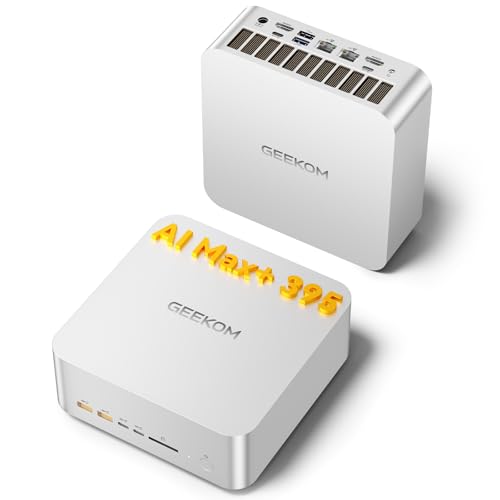
Two 2.5GbE ports, two HDMI 2.1 outputs and a stated limit of four displays set the GEEKOM A9 Mega apart, so it suits a homelab or a desk where you want a confirmed screen count better than the BOSGAME M5. The BOSGAME M5 suits a buyer who wants five USB-A ports and an SD card reader on the same class of machine. Inside, the two match: an AMD Ryzen AI Max+ 395 with 16 cores, 128 GB of soldered LPDDR5X and 2000 GB of NVMe PCIe 4.0 storage.
CPU, GPU, installed memory and storage describe the configurations shown above. Memory limits, slots and ports describe the chassis; other configurations can differ.
| Specification | BOSGAME M5 | GEEKOM A9 Mega |
|---|---|---|
| Processor | Not confirmed | AMD Ryzen AI Max+ 395 |
| Graphics | Not confirmed | AMD Radeon 8060S |
| Installed memory | Not confirmed | 128 GB |
| Installed storage | Not confirmed | 2 TB |
| Maximum memory | 128 GB | 128 GB |
| Memory slots | 0 | 0 |
| M.2 slots | 2 | 2 |
| LAN speed | 2.5GbE | 2.5GbE |
| USB4 ports | 2 | 2 |
| Thunderbolt ports | 0 | 0 |
For everyday work and for coding, both machines are well suited, and for the same reason: 16 cores, 32 threads and 128 GB of memory, plus two USB4 ports. GEEKOM gives its USB4 ports as 40 Gbps.
Gaming is workable on both and no better on either, because each relies on the integrated Radeon 8060S sharing system memory, with no discrete GPU.
Local AI is well suited on both: 128 GB of LPDDR5X-8000 is shared with the graphics, and that capacity decides which model sizes fit. Neither maker states the memory bandwidth, which governs how fast text is generated, so generation speed stays an open question on both. Both also carry an NPU with 50 TOPS.
Workstation work is well suited on both, with 128 GB installed.
Homelab use is where they part: the GEEKOM is well suited, the BOSGAME only workable. The GEEKOM has two 2.5GbE ports and two PCIe 4.0 x4 M.2 slots, so routing or separating networks on the box itself is realistic. The BOSGAME has a single 2.5GbE port, which limits that, and BOSGAME does not state the second M.2 slot's PCIe generation.
Memory headroom is zero on both: the 128 GB is soldered, there are no memory slots, and 128 GB is also the maximum. What you buy is what you keep, so settle the memory question before ordering.
Storage is where you can grow. Each machine has two M.2 slots for 2280 drives, alongside the 2000 GB it ships with. On the GEEKOM both slots are PCIe 4.0, so an added M.2 drive runs at PCIe 4.0 speed, and a PCIe 5.0 drive would drop to that. On the BOSGAME the first slot is PCIe 4.0, but BOSGAME does not state the second slot's generation, so a second drive's speed is uncertain. Neither has a PCIe slot or OCuLink for expansion cards or an external graphics card.
Both include Wi-Fi 7 with the wireless module fitted, two USB4 ports and two USB-C ports with DisplayPort alt mode, so screens can run over USB-C on either.
The GEEKOM adds two HDMI 2.1 outputs and supports up to four displays; HDMI 2.1 features such as 4K above 60 Hz also need a 48 Gbps cable and an HDMI 2.1 display. It has two 2.5GbE ports and Bluetooth 5.4, and runs from a 330W external power supply for a 120 W TDP.
The BOSGAME has five USB-A ports, an SD card reader and one 2.5GbE port. BOSGAME does not state its HDMI or DisplayPort outputs or the maximum number of displays, so plan your screens around the USB-C ports until you confirm.
The fair comparison is the 128 GB model of each, and they line up exactly: the AMD Ryzen AI Max+ 395 with Radeon 8060S graphics, 128 GB of LPDDR5X, 2000 GB of NVMe PCIe 4.0 storage and Windows 11 Pro, new and sold at retail. Both are 2025 machines. Because chip, memory and storage match on paper, the choice comes down to ports and networking. Pick the GEEKOM for two network ports and HDMI, the BOSGAME for USB-A ports and the card reader.
If neither fits, the reason is likely something both share: soldered memory capped at 128 GB, no PCIe slot and no OCuLink. A buyer who wants to add memory later or attach an external graphics card needs a machine with memory slots or OCuLink, which these two do not offer. The same goes for anyone who wants a discrete GPU for gaming, where both are only workable.
The best configuration of each machine, as our fit rules judge it.
| Workload | BOSGAME M5 | GEEKOM A9 Mega |
|---|---|---|
| Everyday | Good | Good |
| Coding | Good | Good |
| Gaming | Workable | Workable |
| Home lab | Workable | Good |
| Local AI | Good | Good |
| Workstation | Good | Good |
On paper the processor and memory match: both use the AMD Ryzen AI Max+ 395 with 16 cores, 32 threads and 128 GB of LPDDR5X at 8000 MT/s. GEEKOM states a 120 W TDP; BOSGAME does not state one, so sustained power could differ.
No. On both machines the 128 GB is soldered, there are no memory slots and 128 GB is also the maximum. Storage is the upgrade path instead: each machine has two M.2 slots that take 2280 drives.
GEEKOM states a maximum of four displays for the A9 Mega, which has two HDMI 2.1 outputs, and its two USB-C ports carry DisplayPort alt mode. BOSGAME does not state the M5's maximum displays or HDMI outputs, though its two USB-C ports also carry DisplayPort alt mode.
Both are well suited, with 128 GB of LPDDR5X-8000 unified memory shared with the graphics. Capacity decides which models fit; neither maker states memory bandwidth, which sets generation speed, so neither has a stated speed advantage.
Fields we could not confirm from the manufacturer are marked not confirmed rather than guessed. Product prices and availability are accurate as of the date/time indicated and are subject to change. Any price and availability information displayed on Amazon.co.uk at the time of purchase will apply to the purchase of this product.