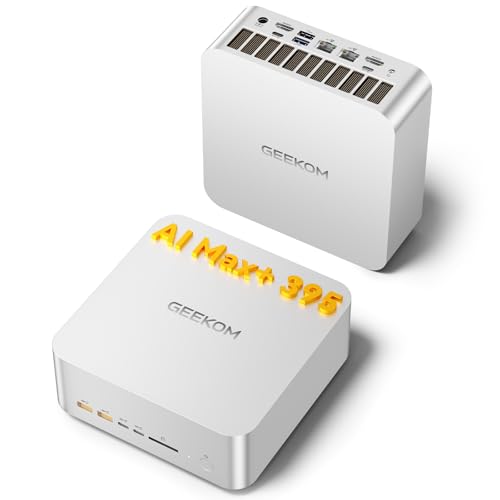
AMD Ryzen AI Max+ 395, 128 GB / 2 TB
AMD Ryzen AI Max+ 395
CPU
128 GB LPDDR5X
RAM
2 TB SSD
STORAGE
Dual 2.5GbE
NETWORK
£3,399.00
GEEKOM A9 Mega: compare this configuration by processor, memory, storage, connections and UK price. Check the exact build and upgrade options before buying.
Updated
GEEKOM's A9 Mega is a memory-first compact desktop: 128 GB of soldered LPDDR5X at 8000 MT/s, shared by a 16-core AMD Ryzen AI Max+ 395 and its integrated Radeon 8060S graphics. That makes it a strong pick for local AI models, virtual machines and heavy builds on one compact box instead of a tower with a graphics card. The memory cannot grow, so 128 GB is where it stays.
It suits you if memory limits your work more than a graphics card does. For local AI, check the exact model release, quantisation, context length, runtime overhead and memory available after the operating system. System RAM and GPU VRAM are different limits; shared-memory allocation depends on firmware, drivers and the backend. CPU inference or partial offloading can change what loads and its speed. Installed capacity alone does not establish compatibility or useful generation speed. Check the current Ollama or LM Studio hardware documentation for the exact GPU and operating system. Developers running containers and several virtual machines also get room from 16 cores, 32 threads and two 2.5GbE ports.
Skip it if gaming is the main job, because the integrated Radeon 8060S makes gaming workable rather than well suited and there is no discrete GPU. Skip it too if you plan to add memory or fit a PCIe card, since the memory is soldered and there is no PCIe slot.
Everyday use is well suited: the hardware comfortably exceeds what daily work needs, and Windows 11 Pro comes preinstalled.
Coding is well suited. Sixteen cores, 32 threads and 128 GB of memory handle large builds and several services at once, and two 40 Gbps USB4 ports take fast external drives or docks.
Gaming is workable. The Radeon 8060S is integrated graphics working from the shared memory, with no discrete GPU behind it.
Homelab use is well suited. Two 2.5GbE ports let you split traffic between networks, and two M.2 slots hold fast storage for virtual machines. With the memory soldered, the 128 GB you start with is what every guest shares.
Local AI is well suited. The 128 GB of LPDDR5X-8000 is unified with the graphics, so most of it can go to models rather than the system. There is also an NPU with 50 TOPS. GEEKOM does not state the memory bandwidth and generation speed is not measured, so capacity is the reason to choose it.
Workstation work is well suited, with 128 GB installed for large datasets and heavy multitasking.
| Configuration | Everyday | Coding | Gaming | Home lab | Local AI | Workstation |
|---|---|---|---|---|---|---|
| 128 GB unified, 2 TB | Good | Good | Workable | Good | Good | Good |
There is one configuration to know. It pairs the Ryzen AI Max+ 395 with 128 GB of LPDDR5X, a 2000 GB NVMe PCIe 4.0 drive and Windows 11 Pro. It is a new 2025 machine, not a barebones kit, so it is ready to use out of the box. Because the installed memory already equals the maximum, the real question is whether 128 GB suits your work.
Memory has no headroom. There are no memory slots, the LPDDR5X is soldered, and the 128 GB installed is also the maximum. That is a generous ceiling, but it is fixed on day one.
Storage is where the flexibility lies. The two M.2 slots take 2280 drives, so you can replace the 2000 GB drive or add a second one for virtual machines and model files. Both slots use fourth-generation PCIe. There is no PCIe card slot.
You can run up to four displays. Two connect over the HDMI 2.1 outputs, and the two USB-C ports support DisplayPort alt mode for the rest. There are no dedicated DisplayPort outputs, so plan on HDMI cables plus USB-C monitors or USB-C to DisplayPort cables.
Networking covers two 2.5GbE ports, a Wi-Fi 7 module and Bluetooth 5.4. The two USB4 ports are the fast external connections; there are no Thunderbolt ports and no OCuLink. Power comes from a 330W external supply, and the processor's TDP is 120 W.
Specifications are taken from the manufacturer. Fields we could not confirm are marked not confirmed. Source
The soldered 128 GB cannot be expanded or replaced, and there is no PCIe slot, no OCuLink and no Thunderbolt. Gaming is only workable, with no discrete GPU. GEEKOM does not state the dimensions or volume, the graphics memory allocation or its type, the memory bandwidth, ECC support, M.2 SATA support, SATA bays, the number of USB-A ports, an SD card reader or a VESA mount. If you rely on USB-A peripherals or desk mounting, check those first.
The BOSGAME M5 is a close match on paper, so the choice comes down to details side by side. Compare its network ports with this machine's two 2.5GbE ports, and its display outputs with the two HDMI 2.1 ports plus USB-C alt mode for up to four screens. Check the power supply too, since the A9 Mega uses a 330W external one, and compare storage against its two M.2 slots.


No. The A9 Mega has no memory slots and its LPDDR5X is soldered to the board. It ships with 128 GB, which is also the maximum, so the memory you buy is the memory you keep for the life of the machine.
Up to four. Two connect through the HDMI 2.1 outputs, and the two USB-C ports support DisplayPort alt mode. There are no dedicated DisplayPort outputs, so use USB-C monitors or a USB-C to DisplayPort cable for the extra screens.
Yes, it is well suited. For local AI, check the exact model release, quantisation, context length, runtime overhead and memory available after the operating system. System RAM and GPU VRAM are different limits; shared-memory allocation depends on firmware, drivers and the backend. CPU inference or partial offloading can change what loads and its speed. Installed capacity alone does not establish compatibility or useful generation speed. Check the current Ollama or LM Studio hardware documentation for the exact GPU and operating system. Generation speed is not measured, so capacity is the main draw.
Gaming is workable. It relies on the integrated Radeon 8060S, which draws on the shared memory, and there is no discrete GPU. Treat it as a capable all-round desktop that can game, rather than a machine built around demanding titles.
Fields we could not confirm from the manufacturer are marked not confirmed rather than guessed. Product prices and availability are accurate as of the date/time indicated and are subject to change. Any price and availability information displayed on Amazon.co.uk at the time of purchase will apply to the purchase of this product.