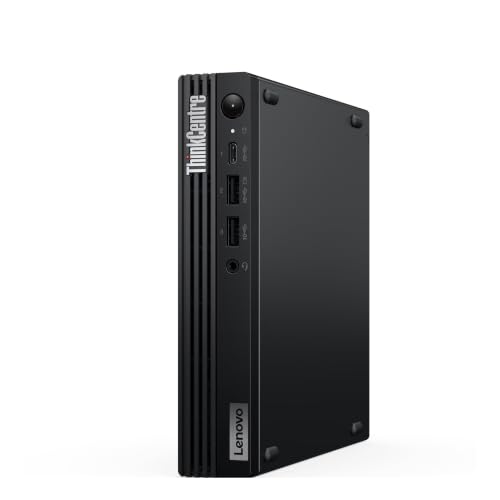
AMD Ryzen 7 PRO 8700GE, 16 GB / 512 GB
AMD Ryzen 7 PRO 8700GE
CPU
16 GB DDR5
RAM
512 GB SSD
STORAGE
1GbE
NETWORK
£999.00
Lenovo ThinkCentre M75q Gen 5: compare 3 configurations by processor, memory, storage, connections and UK price. Check the exact build and upgrade options before buying.
Updated
Lenovo's ThinkCentre M75q Gen 5 puts an AMD Ryzen PRO processor, socketed DDR5 and two M.2 slots into a 1.2-litre case that can hang on a VESA mount. It is well suited to everyday office work and workable for coding. The 32 GB model with the Ryzen 7 PRO 8700GE and 1024 GB of storage is the build that handles coding well. Skip it for gaming or workstation jobs, where it is a poor fit.

It suits an office or home desk that wants a small Windows 11 Pro machine with plenty of USB. With 6 USB-A ports, keyboards, drives and dongles connect without a hub, and two screens cover most spreadsheet and browser work. Developers who want headroom should take the 32 GB build or plan to fill the memory slots later.
Skip it if you want to play games, run local language models on a 16 GB build or build a multi-port network box. The single 1GbE port limits networking projects. Anyone who needs more than 32 GB of memory or a graphics card should look elsewhere.
Everyday work is well suited: browsing, office apps and video calls sit comfortably on six or eight Ryzen cores with 16 GB of DDR5 as the starting point.
Coding is workable on the two 16 GB builds and well suited on the 32 GB build, and the 16 GB machines have two slots that can take them to 32 GB.
Gaming is a poor fit, because the graphics are the integrated Radeon 780M or Radeon 740M.
Homelab use is workable: two M.2 slots give room for virtual machine and container storage, but one network port rules out separate LAN and WAN ports for a router.
Local AI is a poor fit on the 16 GB builds and workable on the 32 GB build. For local AI, check the exact model release, quantisation, context length, runtime overhead and memory available after the operating system. System RAM and GPU VRAM are different limits; shared-memory allocation depends on firmware, drivers and the backend. CPU inference or partial offloading can change what loads and its speed. Installed capacity alone does not establish compatibility or useful generation speed. Check the current Ollama or LM Studio hardware documentation for the exact GPU and operating system. Lenovo does not state the memory bandwidth, which governs how fast text is generated.
Workstation work is a poor fit: there is no discrete graphics, no card slot, only two memory slots and a 32 GB ceiling.
| Configuration | Everyday | Coding | Gaming | Home lab | Local AI | Workstation |
|---|---|---|---|---|---|---|
| 16 GB / 512 GB | Good | Workable | Not suited | Workable | Not suited | Not suited |
| Ryzen 5 PRO, 16 GB / 512 GB | Good | Workable | Not suited | Workable | Not suited | Not suited |
| 32 GB / 1 TB | Good | Good | Not suited | Workable | Workable | Not suited |
All three retail builds are new, run Windows 11 Pro and use NVMe storage. The Ryzen 5 PRO 8500GE build has six cores, twelve threads, Radeon 740M graphics, 16 GB of memory and 512 GB of storage. The 16 GB Ryzen 7 PRO 8700GE build steps up to eight cores, sixteen threads and Radeon 780M graphics with the same 16 GB and 512 GB. The 32 GB Ryzen 7 PRO 8700GE build doubles both, to 32 GB and 1024 GB. Pick the Ryzen 5 for office desks, the 16 GB Ryzen 7 for more processor and graphics, and the 32 GB model for coding or local AI.
The memory is not soldered: two SODIMM slots take DDR5 at 5200 MT/s, up to 32 GB. The 16 GB builds therefore have 16 GB of headroom, while the 32 GB build already sits at the ceiling.
Storage goes into two M.2 slots for 2280 drives, and neither slot accepts SATA M.2 drives. The first slot runs at PCIe 4.0, so a PCIe 5.0 drive there runs at PCIe 4.0 speed. Lenovo does not state the second slot's PCIe generation, so do not count on PCIe 4.0 speed from an M.2 drive added there. There are no SATA bays.
For screens you get one HDMI output and one DisplayPort 1.4 output, and two displays is the maximum. Lenovo does not state the HDMI version, so do not plan on 4K above 60 Hz over HDMI, which needs HDMI 2.1 on the computer, the cable and the display. The single USB-C port and 6 USB-A ports take care of peripherals and external drives.
Networking is one 1GbE port, and a wireless module is included. Power comes from a 65W external supply. For an external graphics card, the box has no USB4, Thunderbolt or OCuLink port.
Specifications are taken from the manufacturer. Fields we could not confirm are marked not confirmed. Source
The memory stops at 32 GB, there is a single 1GbE port, no SATA bays and no card slot. Lenovo does not state the graphics memory or its type, the memory bandwidth, ECC support, the second M.2 slot's PCIe generation, the Wi-Fi standard, Bluetooth, the HDMI version, whether there is an SD card reader, or the TDP. If any of these matter to you, check Lenovo's own specification page before buying.
The Lenovo ThinkCentre neo 50q Gen 6 swaps in an Intel Core Ultra 7 256V, but its memory tops out at 16 GB rather than 32 GB, so it suits you only if 16 GB will always be enough. The GMKtec NucBox K8 Plus uses an AMD Ryzen 7 8845HS and reaches 128 GB of memory rather than 32 GB, which decides which language models fit. Against either, also compare the network ports and the M.2 slots, since this one has a single port and two slots.



Yes. The memory is not soldered, and two SODIMM slots take DDR5 up to 32 GB. The 16 GB builds can double their memory, while the 32 GB build with the Ryzen 7 PRO 8700GE already sits at that maximum.
Up to two, through one HDMI output and one DisplayPort 1.4 output. Lenovo does not state the HDMI version, so if a monitor needs HDMI 2.1 features such as 4K above 60 Hz, use the DisplayPort output or confirm the HDMI version first.
Yes, a wireless module is included. Lenovo does not state the Wi-Fi standard or the Bluetooth version, so check the specification page if you need a particular standard. For a wired connection there is one 1GbE network port.
Only the 32 GB build is workable for local AI, and the 16 GB builds are a poor fit. For local AI, check the exact model release, quantisation, context length, runtime overhead and memory available after the operating system. System RAM and GPU VRAM are different limits; shared-memory allocation depends on firmware, drivers and the backend. CPU inference or partial offloading can change what loads and its speed. Installed capacity alone does not establish compatibility or useful generation speed. Check the current Ollama or LM Studio hardware documentation for the exact GPU and operating system. Lenovo does not state the memory bandwidth, which sets generation speed.
Fields we could not confirm from the manufacturer are marked not confirmed rather than guessed. Product prices and availability are accurate as of the date/time indicated and are subject to change. Any price and availability information displayed on Amazon.co.uk at the time of purchase will apply to the purchase of this product.