
Intel Core Ultra 5 235, 16 GB / 512 GB
Above typical price
Intel Core Ultra 5 235
CPU
16 GB DDR5
RAM
512 GB SSD
STORAGE
1GbE
NETWORK
£1,617.76
Lenovo ThinkStation P3 Ultra SFF Gen 2: compare 11 configurations by processor, memory, storage, connections and UK price. Check the exact build and upgrade options before buying.
Updated
Lenovo's ThinkStation P3 Ultra SFF Gen 2 is a 3.9-litre compact workstation with a PCIe card slot of 8 lanes, ECC support and 2 SODIMM slots that take up to 128 GB of DDR5. Choose it for professional work that wants discrete graphics and memory you can grow. For gaming, the RTX PRO 2000 Blackwell build is well suited and the Arc Pro B50 build is workable. With one 1GbE port, it is a weaker network box.
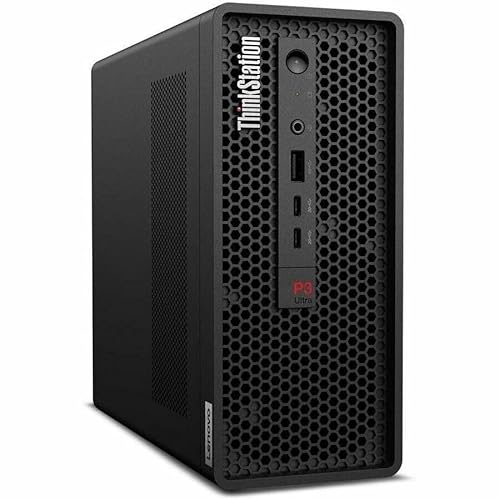
It suits you if you want workstation features without a tower: ECC support, memory up to 128 GB, 3 M.2 slots and a PCIe card slot in a compact case. Developers are well served by every build except the 16 GB Core Ultra 5 235 model, which is workable.
Skip it if gaming is the main job and you do not want the RTX PRO 2000 Blackwell build, the one build well suited to it. Skip it too for a router, firewall or multi-port server, since it has one 1GbE port. If you need wireless, choose carefully: only the Core Ultra 5 235 build and the RTX A400 build include a wireless module.
Everyday work is well suited on every build, all of which pair DDR5 memory with NVMe storage.
Coding is well suited on the builds with 32 GB, 48 GB or 64 GB, and workable on the 16 GB Core Ultra 5 235 model.
Gaming is a poor fit on the builds with Intel Graphics and on the RTX A400 build with its 4 GB. The Core Ultra 7 265 with the Arc Pro B50 and 16 GB of GDDR6 is workable, and the Core Ultra 9 285 with the RTX PRO 2000 Blackwell and 16 GB of GDDR7 is well suited.
Local AI is a poor fit on the 16 GB model and workable on the rest, with the 64 GB builds giving the most room for larger models. Every build includes an NPU of 13 TOPS. Lenovo does not state the memory bandwidth, and bandwidth governs how fast a model generates text, so speed is hard to predict.
Homelab use is workable: 3 M.2 slots give room for storage, but there is one network port at 1GbE.
Workstation use is well suited, thanks to the PCIe card slot with 8 lanes, ECC support and the discrete graphics options.
| Configuration | Everyday | Coding | Gaming | Home lab | Local AI | Workstation |
|---|---|---|---|---|---|---|
| Core Ultra 5 235, 16 GB / 512 GB | Good | Workable | Not suited | Workable | Not suited | Good |
| Core Ultra 5 225, 32 GB / 512 GB | Good | Good | Not suited | Workable | Workable | Good |
| Core Ultra 7 265, 32 GB / 512 GB | Good | Good | Not suited | Workable | Workable | Good |
| Core Ultra 7 265, RTX A400, 32 GB / 512 GB | Good | Good | Not suited | Workable | Workable | Good |
| Core Ultra 7 265K, 32 GB / 512 GB | Good | Good | Not suited | Workable | Workable | Good |
| Core Ultra 7 265, 48 GB / 512 GB | Good | Good | Not suited | Workable | Workable | Good |
| Core Ultra 7 265, Arc Pro B50, 48 GB / 512 GB | Good | Good | Workable | Workable | Workable | Good |
| Core Ultra 9 285, 48 GB / 512 GB, no OS | Good | Good | Not suited | Workable | Workable | Good |
| Core Ultra 9 285, RTX PRO 2000, 48 GB / 512 GB | Good | Good | Good | Workable | Workable | Good |
| Core Ultra 9 285K, 64 GB / 512 GB | Good | Good | Not suited | Workable | Workable | Good |
| Core Ultra 9 285, 64 GB / 1 TB | Good | Good | Not suited | Workable | Workable | Good |
By count, the processor splits the builds more finely than the graphics does. The 16 GB Core Ultra 5 235 with wireless suits a light office desk. The 32 GB builds with the Core Ultra 5 225, Core Ultra 7 265 or Core Ultra 7 265K are sensible developer picks. For professional graphics, choose the Core Ultra 7 265 with the RTX A400 and 4 GB of GDDR6, which also has wireless, or the 48 GB Core Ultra 7 265 with the Arc Pro B50 and 16 GB of GDDR6. The Core Ultra 9 285 with the RTX PRO 2000 Blackwell also covers gaming.
Memory is not soldered: 2 SODIMM slots take DDR5 at 6400 MT/s, up to 128 GB, with ECC support. Even the 64 GB builds sit below the 128 GB maximum.
Storage spreads across 3 M.2 slots of 2280 length; the first runs at PCIe generation 5 and the second at generation 4. A PCIe 5.0 drive keeps its full speed in the first slot and runs at PCIe 4.0 speed in the second, and Lenovo does not state the third slot's generation. Most builds ship with 512 GB of NVMe storage, and the 64 GB Core Ultra 9 285 build ships with 1000 GB. The PCIe card slot is x16 in physical size with 8 lanes.
Screens connect through 3 DisplayPort 1.4 outputs, for up to 3 displays, and there is no HDMI output. Plan on a DisplayPort cable for every monitor. Peripherals get 5 USB-A ports and 2 USB-C ports. There are no USB4 or Thunderbolt ports and no OCuLink. Networking is one 1GbE Ethernet port, with a wireless module only in the Core Ultra 5 235 build and the Core Ultra 7 265 build with the RTX A400. Power comes from an external adapter of 170 W to 330 W, depending on the build.
Specifications are taken from the manufacturer. Fields we could not confirm are marked not confirmed. Source
The single 1GbE port and the lack of HDMI are the clear gaps. Most builds have no wireless module. Lenovo does not state the Wi-Fi standard, Bluetooth, M.2 SATA support, SATA bays, an SD card reader, the VESA mount, the TDP, the memory bandwidth, the graphics memory of the Intel Graphics builds, the release year, or the operating system of the 48 GB Core Ultra 9 285 build with Intel Graphics.
The Dell Pro Max Micro FCM2250 uses an Intel Core Ultra 5 245 but tops out at 64 GB of memory, against 128 GB here. The Apple Mac mini (M5 Pro) moves you to the Apple M5 Pro, also with a 64 GB ceiling, so it makes sense if you prefer Apple's platform over memory headroom. The MINISFORUM MS-02 Ultra brings an Intel Core Ultra 9 285HX and a 256 GB ceiling, the one to consider if 128 GB is not enough.



Yes, ECC support is confirmed, and the 2 SODIMM slots take DDR5 at 6400 MT/s up to 128 GB. The memory is not soldered, so you can fit your own modules when you upgrade.
Up to 3, through its 3 DisplayPort 1.4 outputs. There is no HDMI output, so plan on DisplayPort cables for every screen, and keep that in mind if your monitors only have HDMI inputs.
The Core Ultra 9 285 with the NVIDIA RTX PRO 2000 Blackwell and 16 GB of GDDR7 is well suited. The Core Ultra 7 265 with the Arc Pro B50 is workable. The builds with Intel Graphics or the RTX A400 are a poor fit.
Only the 16 GB Core Ultra 5 235 build and the Core Ultra 7 265 build with the RTX A400 include a wireless module. The other builds rely on the single 1GbE Ethernet port, so plan on running a network cable.
Fields we could not confirm from the manufacturer are marked not confirmed rather than guessed. Product prices and availability are accurate as of the date/time indicated and are subject to change. Any price and availability information displayed on Amazon.co.uk at the time of purchase will apply to the purchase of this product.