
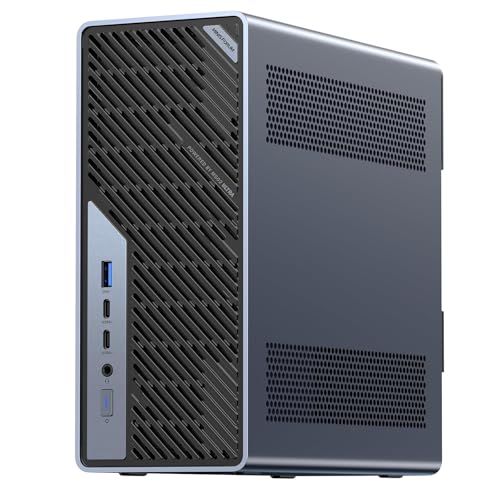
MINISFORUM MS-01
Intel Core i5-12600H
CPU
BAREBONES
CONFIG
RAM & SSD required
2x 10GbE SFP+
NETWORK
2x 2.5GbE
NETWORK
£399.99
Kit price, before RAM and SSD
Chassis, processor and ports. You add the memory and storage.
A barebones kit is a complete mini PC without memory, storage or an operating system. You buy the chassis, the processor and the ports, then fit the parts you want. That usually works out cheaper for a given specification and lets you fit more memory than the configured versions offer, but it is not a working computer on the day it arrives. The listed price is the kit price, before memory and storage. These never appear in ready to use results, and the finder will not count a kit against a budget unless you have explicitly asked for barebones.
Step 1
A barebones kit is a complete mini PC without memory, storage or an operating system. You get the chassis, the processor, the ports and the cooling. It is not a working computer on the day it arrives, and the price shown is the kit price, before the parts you add.
Step 2
Add the memory, an M.2 drive and usually a Windows or Linux licence. A kit is normally cheaper than the configured version at the same specification, but that gap narrows once you have bought good parts. Compare the finished total, not the headline.
Step 3
Check the memory type, the number of SODIMM slots and the maximum capacity on the model page before buying modules. Two slots usually means dual channel, which matters most on machines with integrated graphics. Buying a single module to save money can cost performance you paid for.
Step 4
Most kits take M.2 2280, but some have a shorter 2242 second slot, and PCIe generation varies between slots on the same board. The model page lists what each slot accepts.
7 mini PCs




Memory slots and type
What modules to buy
Two SODIMM slots for dual channel; check DDR4 against DDR5
Maximum memory
How far it can grow
Published ceiling per model, from 32 GB to 128 GB
M.2 slots
What drives fit
Length 2280 or 2242, and PCIe generation per slot
Processor
Fixed on the day you buy
The one thing a kit does not let you choose later
Graphics
Also fixed
Integrated on most kits; a few performance kits ship a discrete GPU
Memory, an M.2 drive and usually a Windows or Linux licence. Check the memory type and the slot count on the model page, because a kit that takes two SODIMM modules behaves differently from one with soldered memory.
Usually, for the same specification, and you choose the parts. Whether it is cheaper once you have bought memory and a drive depends on what you fit.
They need one assembly step and an operating system install. No soldering and usually no tools beyond a screwdriver.
Product prices and availability are accurate as of the date/time indicated and are subject to change. Any price and availability information displayed on Amazon.co.uk at the time of purchase will apply to the purchase of this product.