Compare installed memory, GPU support, expansion and UK prices for your chosen model and runtime.
At a glance64 GB or more
What decides this
For local language models, check usable memory, model size, quantisation and context length first. Leave room for the operating system and runtime. Shared or unified memory can make larger models practical, but the GPU backend, memory allocation and bandwidth still affect compatibility and speed. The shortlist uses installed memory as a capacity filter; it does not predict tokens per second.
Which models should you consider?
Compare these local configurations by price, connections and upgrade options. Choose the features you need; their order does not establish a performance winner.
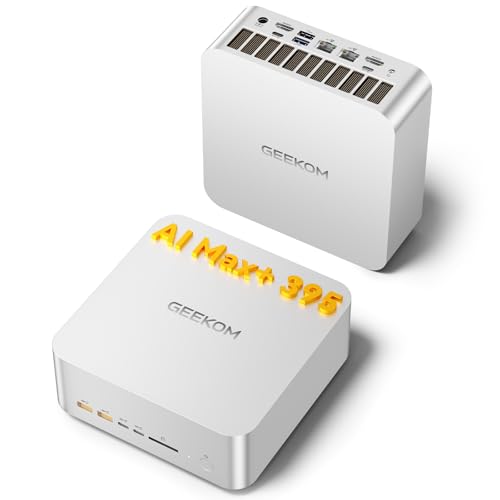
For running language models locally. Compare its price with HP Z2 Mini G1a; pay extra only for features you will use. It includes 128 GB of RAM versus 64 GB in HP Z2 Mini G1a, giving more capacity for memory-heavy work. Its installed SSD is 2000 GB, compared with 1000 GB in HP Z2 Mini G1a. Its 2 wired network ports offer more physical connections than the 1 on GMKtec EVO-X2. This configuration pairs AMD Radeon 8060S with 128 GB of system memory. Check that exact GPU in your runtime's support list.
Trade-off: GPU acceleration and usable memory depend on the exact operating system, driver and runtime; generation speed is unmeasured. Its 128 GB of RAM cannot be upgraded later.
For running language models locally. Compare its price with HP Z2 Mini G1a; pay extra only for features you will use. It includes 128 GB of RAM versus 64 GB in HP Z2 Mini G1a, giving more capacity for memory-heavy work. Its installed SSD is 2000 GB, compared with 1000 GB in HP Z2 Mini G1a. This configuration pairs AMD Radeon 8060S with 128 GB of system memory. Check that exact GPU in your runtime's support list.
Trade-off: Its CPU, GPU and installed RAM/SSD match the less expensive GEEKOM A9 Mega; no measured performance advantage is established here. GPU acceleration and usable memory depend on the exact operating system, driver and runtime; generation speed is unmeasured. Its 128 GB of RAM cannot be upgraded later. There is one built-in wired network port (2.5GbE); separate physical links need additional hardware.
For running language models locally. It has the lowest current UK price among these recommendations. This configuration pairs AMD Radeon 8050S with 64 GB of system memory. Check that exact GPU in your runtime's support list.
Trade-off: GPU acceleration and usable memory depend on the exact operating system, driver and runtime; generation speed is unmeasured. Its 64 GB of RAM cannot be upgraded later. There is one built-in wired network port (2.5GbE); separate physical links need additional hardware.
Loading a model and using it comfortably are different checks
Choose an exact model release and quantisation, then allow memory for its weights, context/KV cache, runtime buffers and operating system. For illustration, 70 billion parameters at exactly four bits is about 35 GB of weights before metadata and overhead; this arithmetic is not a claim that every 70B model runs in 64 GB. Longer contexts, parallel requests and offloading change memory use. Look for measurements of your exact model, context and backend before judging useful speed.
Check the memory path used by your software
Unified or shared memory does not make all installed RAM automatically available to GPU inference. Firmware reservations, drivers, the operating system and the runtime determine the usable allocation. Socketed system RAM can run CPU inference and support offloading; it is not inherently unavailable to a model. A discrete GPU has its own VRAM limit. Confirm the supported acceleration path in Ollama or LM Studio rather than inferring support from a memory type or NPU label.
Check the exact configuration and upgrade path
Memory upgradeability varies by model. The Lenovo ThinkStation P3 Ultra SFF Gen 2 has two replaceable DDR5 memory slots and a documented maximum of 128 GB; the listed 64 GB is installed capacity, not soldered memory. Lenovo specifies compatible module types and may require upgrade kits. Other models, including soldered-memory designs, must be bought with the capacity you need. Check each product page for the actual configuration, memory slots, storage connections and documented limits.
Both run local models, but their model formats, runtime versions and GPU support can differ. Ollama documents its supported NVIDIA, AMD and Apple acceleration paths; LM Studio offers llama.cpp runtimes and MLX on Apple Silicon. Check your exact GPU, operating system, driver and model format in the current documentation. A machine working with one setup does not establish identical offloading, memory use or speed in the other.
Is unified memory better than a graphics card?
Choose by the model and runtime. Unified memory may allow a larger GPU-accessible pool, but the operating system and runtime still need space and allocation limits vary. With a discrete GPU, VRAM is separate from system RAM; CPU offloading may help a model load while changing its speed. There is no measured speed winner here.
Does the NPU figure matter?
A TOPS figure alone does not establish language-model support or generation speed. Check whether the exact runtime and model can use the NPU. Otherwise CPU and GPU support, available memory and sustained bandwidth are more useful buying checks.
Product prices and availability are accurate as of the date/time indicated and are subject to change. Any price and availability information displayed on Amazon.co.uk at the time of purchase will apply to the purchase of this product.