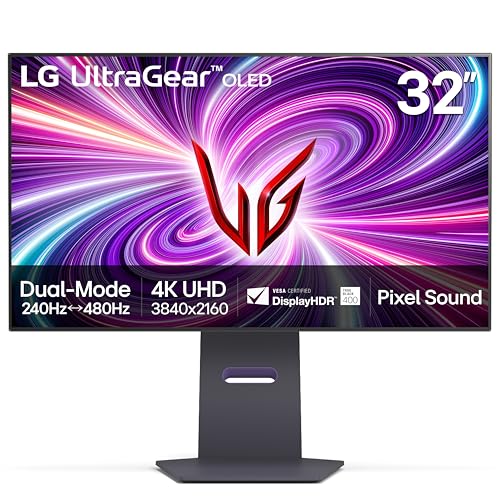
LG UltraGear 32GS95UE
32GS95UE-B.AUS
31.5"
Size
3840x2160
Resolution
240 Hz
Refresh
OLED
Panel
$1,439.00
Part number32GS95UE-B.AUS
The same part under other regional numbers: 32GS95UE-B, 32GS95UE-B.AEU, 32GS95UE-B.AEK
The LG UltraGear 32GS95UE is a 31.5" OLED monitor running 3840x2160 at 240 Hz, for a mini PC owner who wants a large, sharp, fast desk display and has a video output able to drive it. It takes video over HDMI or DisplayPort and carries DisplayHDR True Black 400 certification.
32GS95UE-B.AUS
The 31.5" panel is OLED at 3840x2160 with a 240 Hz refresh rate. Video comes in over two HDMI inputs or DP 1.4 (DSC). HDR is DisplayHDR True Black 400. You also get built-in speakers and a VESA mount, so you can skip separate desk speakers or use a stand or arm.
LG specification page · read October 21, 2026
A monitor needs a matching video output on the mini PC, and this one takes HDMI or DisplayPort, not USB-C video. The GMKtec NucBox K6, HP Z2 Mini G1a, Lenovo ThinkCentre neo 50q Gen 5 and MINISFORUM MS-02 Ultra have outputs that suit it. The MINISFORUM AtomMan G1 Pro, ACEMAGIC V1 and ASUS NUC 14 Performance connect, but 240 Hz at this resolution is not confirmed for their outputs. For the ASUS ROG NUC 15 and BOSGAME M5 we do not have their HDMI output details, so we have not confirmed it fits.
Checked against every mini PC sold on amazon.com, from the specifications we hold for each machine.
There is no USB-C video input, so the mini PC must connect over HDMI or DisplayPort. Check that your machine's output can carry 240 Hz at 3840x2160. LG does not state the HDMI version, USB-C power delivery, Thunderbolt input, built-in KVM switch or daisy chain out.
The monitor has no USB-C video input, so a mini PC needs an HDMI or DisplayPort output to drive it. Its inputs are HDMI x2 and DP 1.4 (DSC).
That depends on the machine's output. For the MINISFORUM AtomMan G1 Pro, ACEMAGIC V1 and ASUS NUC 14 Performance, 240 Hz at this resolution is not confirmed.
Yes, it has a VESA mount, and it also has built-in speakers, so you can use an arm or stand without adding separate speakers.
Product prices and availability are accurate as of the date/time indicated and are subject to change. Any price and availability information displayed on Amazon.com at the time of purchase will apply to the purchase of this product.